
How to Create an Airbnb Listing Correctly: The Complete Guide

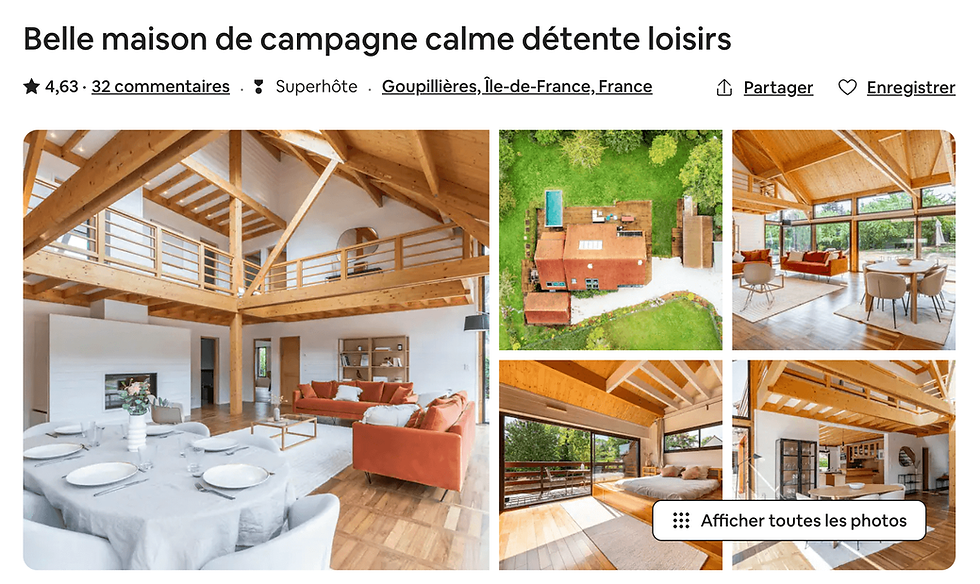
Creating an Airbnb listing may seem simple on the surface: just add a few photos, a description, a price... and you're done. However, attracting guests, getting good reviews, and, above all, generating regular revenue requires much more than just posting. A well-designed, strategic, and engaging listing is the key to standing out in an increasingly competitive market.
In this article, we'll explain step-by-step how to create an effective, professional, and attractive Airbnb listing.
1. Prepare your accommodation well
Before you even begin writing your listing, it's essential that your home is ready to welcome guests. Here are the essential requirements:
Clean and well-maintained accommodation
Functional amenities : Wi-Fi, heating, hot water, quality bedding, etc.
Safety assured : smoke detectors, fire extinguishers, first aid kit.
Tastefully decorated : ambiance matters! A pleasant interior is more appealing.
Storage available : to make guests feel at home.
Also, make sure you comply with local short-term rental laws (declarations, taxes, time limitations, etc.).
2. Create an AirBnB listing with a catchy title
Your listing's title is one of the first things people see on Airbnb. It should capture attention while providing clear information about the property.
Best practices:
Mention an asset: "Cozy studio with a view of the Eiffel Tower"
Be specific: "2-bedroom apartment – 5 minutes from the city center"
Avoid excessive capital letters or unnecessary symbols
Don't lie: transparency is essential
💡 Tip : Test multiple headlines over time to see which one generates the most clicks.
3. Take care of the photos
Photos are the most important factor in the booking decision. They must inspire confidence and make you want to buy.
To do :
Use a good quality camera or hire a professional photographer (Airbnb sometimes offers this service for free).
Take photos in natural light.
Show each room, with wide angles.
Include important details: office area, washing machine, shower, exterior view.
Add a few photos of the surroundings: street, facade, neighborhood.
Organize the photos in a logical order: overview, then each room, then details.
4. Write a clear and engaging description
The description allows you to tell a story, to project the traveler into your space.
Recommended structure :
Introduction
Keep it short and sweet. Ex:
"Welcome to our bright 45 m² apartment located in the heart of old Lyon, a stone's throw from the traboules and typical bouchons."
Description of the accommodation
Talk about the number of rooms, the amenities available, and the ambiance.
What travelers will appreciate
List the advantages: balcony, quality bedding, quiet, proximity to public transport, etc.
Neighborhood and location
Highlight nearby points of interest, shops, restaurants, and transportation options.
Practical Information
Self-guided access, parking, elevator, pets allowed or not, etc.
💡 Tip : Use a warm, personal tone, but stay professional.
5. Add equipment and services
Airbnb offers a list of amenities you can select: coffee machine, iron, television, heating, etc. Take the time to carefully consider these features.
The more equipped your accommodation is, the more it will meet the needs of different types of travelers (families, remote workers, couples, etc.).
Don’t forget the little extras that make the difference:
Toiletries
Coffee and tea available
Personalized neighborhood guide
Netflix or other streaming services
6. Set clear rules
House rules are there to avoid misunderstandings. Include:
Whether parties are prohibited
Arrival and departure times
Whether the accommodation is non-smoking
Whether pets are allowed
It's better to be clear from the start than to have to deal with conflicts later.
7. Set a fair price
The price is crucial. Too high, and you won't get any bookings. Too low, and you risk attracting the wrong people or not getting the most out of your efforts.
Some tips :
Analyze the prices of similar accommodations around you
Take seasonality and local events into account
Activate Airbnb's Smart Pricing if you're just starting out
Consider offering discounts for longer stays
💡 Tip : Offer a discount for your first customers to quickly generate positive reviews.
8. Define a suitable cancellation policy
Airbnb offers several cancellation levels: flexible, moderate, and strict. Choose the one that best suits your strategy.
Flexible attracts more travelers, especially international tourists.
Strict protects your income more in the event of last-minute cancellations.
9. Write an engaging “About Me” section
Travelers like to know who you are. Tell us a little about yourself: your passions, your relationship with hospitality, what you love about your city.
A friendly and responsive host always reassures.
10. Stay available and responsive
Finally, a good Airbnb listing isn't just about what's written. The quality of communication with guests is paramount.
Respond to messages promptly
Be available for questions
Ensure a warm welcome (even remotely)
Remain polite, helpful, and professional at all times
Conclusion: a well-made announcement is a profitable investment
Creating a good Airbnb listing doesn't happen in ten minutes. It requires thought, care, and strategy. But it's worth the effort: a well-optimized listing can transform your home into a real source of regular income, with satisfied guests who leave positive reviews and return.
Take the time to put yourself in your future hosts' shoes and imagine what they would like to see, read, and feel. The customer experience begins with the first click on your listing.


